Remote learning presents a unique opportunity for educators to build stronger relationships with their students and support their well-being in a fully online environment. During remote learning, we are meeting students where they are (literally!) in their homes, offering a window into their worlds while creating new pathways for connection. When approached intentionally, online learning can strengthen relationships, amplify student voice, and help learners build the social and emotional skills they need in an increasingly digital world.
In this article, we’re sharing practical guidance and ready-to-use strategies for teaching wellbeing in remote settings. These strategies are grounded in active learning, connection, and flexibility.
This week’s focus is on empathy and perspective-taking, which are foundational skills for building strong relationships and navigating social interactions, both online and offline. The strategies and activities shared here can be used while teaching the Empathy unit in elementary classrooms or the Empathy and Conflict Resolution course in secondary settings, and can also be easily integrated into any other Peekapak unit or our Steady, Together curriculum.
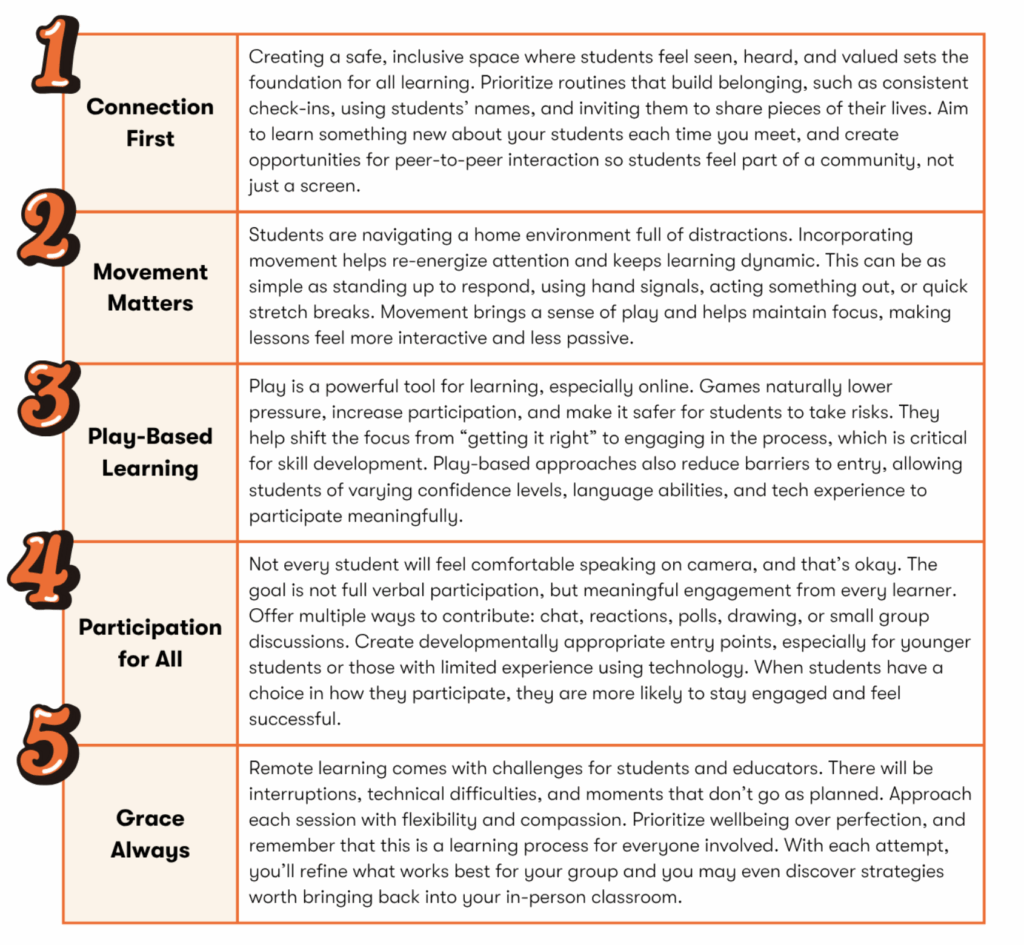
The 5 Principles of Engaging Online Learning
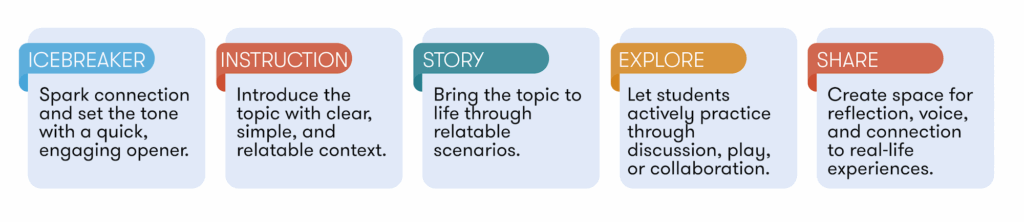
Online Wellbeing Lesson Structure
This structure closely mirrors the familiar flow of a Peekapak lesson, making it easy to bring your existing practice into an online space. At the heart of this approach is storytelling as a powerful tool for wellbeing. Just as important is the emphasis on collaboration over lecture. In virtual environments, students learn best when they actively engage with one another rather than passively listen.
Interactive Activities
Thoughtful icebreakers help students feel comfortable, build connection, and ease into learning. Below are developmentally appropriate options with simple ways to facilitate each.
Kindergarten – Grade 2
What’s That Sound
Play or make a sound and have students guess and then connect it to feelings or experiences.
Animal Sounds
Human Sounds
Nature Sounds
This or That?
Encourages students to express preferences and notice differences/similarities. Students respond using gestures (thumbs up/down) or movement.
Show and Share
Builds self-awareness and helps students learn about each other’s lives. Students share an item and connect it to a feeling or memory.
“Show something you like to do with your family.”
“Find something that makes you feel happy.”
Grade 3 – Grade 5
Mystery Drawing
Give step-by-step drawing instructions. Students can guess along the way and reveal to each other at the end.
This or That?
Encourages students to express preferences and notice differences/similarities. Students respond using gestures (thumbs up/down) or movement.
Would You Rather?
Present students with two choices and have them vote using reactions, chat, or by moving (e.g., stand for A, sit for B). After voting, invite a few students to share their reasoning and encourage others to consider different viewpoints.
Grade 6 – Grade 12
2 Truths and a Lie
Have students share two things that are true and one thing that is not true about themselves. Have students volunteer or randomly select students to share in the chat or off mute, and then poll the class to discover the truth
This or That?
Encourages students to express preferences and notice differences/similarities. Students respond using gestures (thumbs up/down) or movement.
Agree-Disagree Line
Students respond to a statement by choosing where they stand (agree to disagree) and briefly explain their thinking while listening to others’ perspectives.
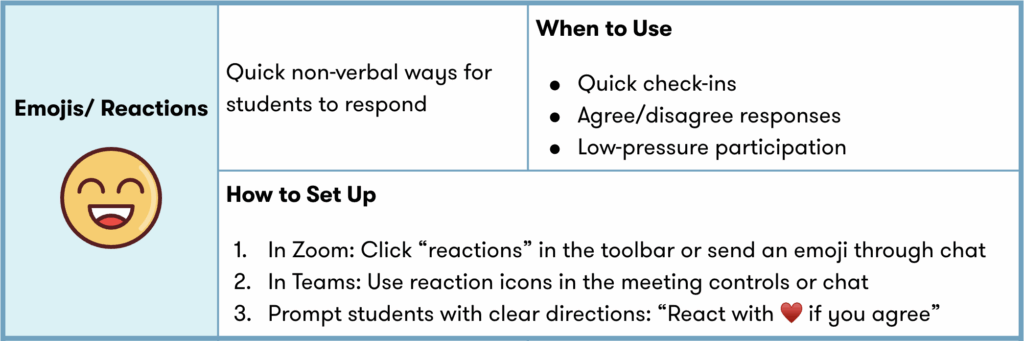
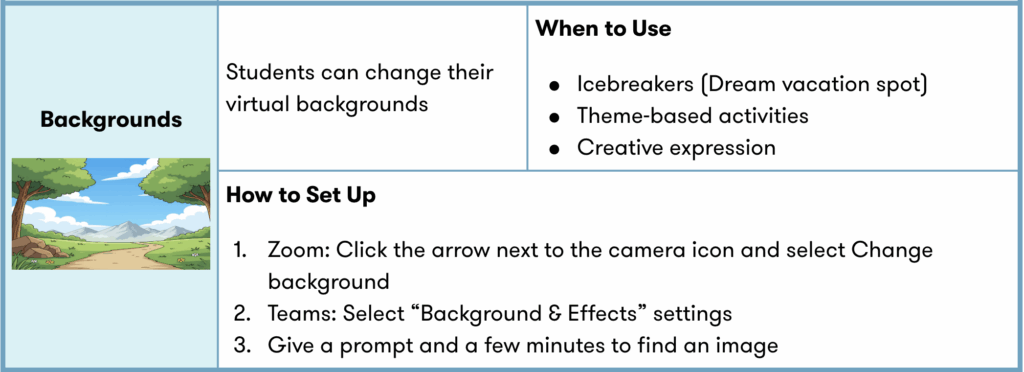
Tool Tips
Online platforms like Zoom and Teams offer simple features that can significantly boost engagement when used with intention. From quick reactions to collaborative whiteboards, these tools help turn passive screens into interactive learning spaces, making it easier for students to participate, share, and connect with one another in real time.
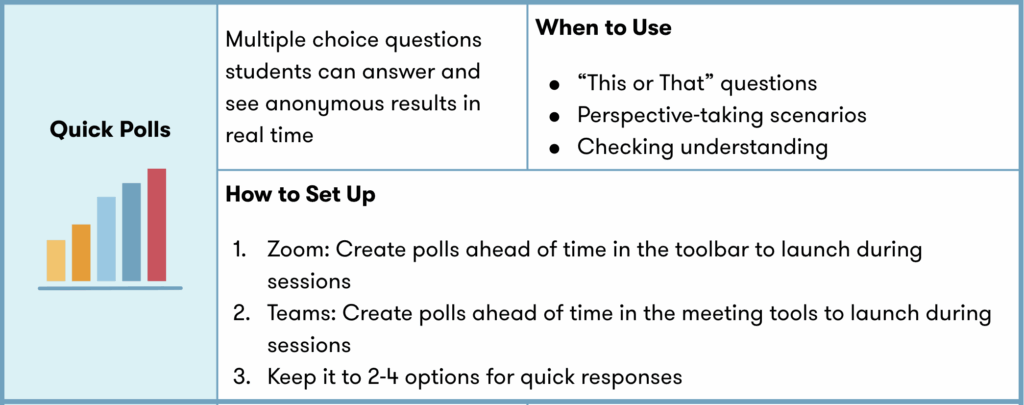
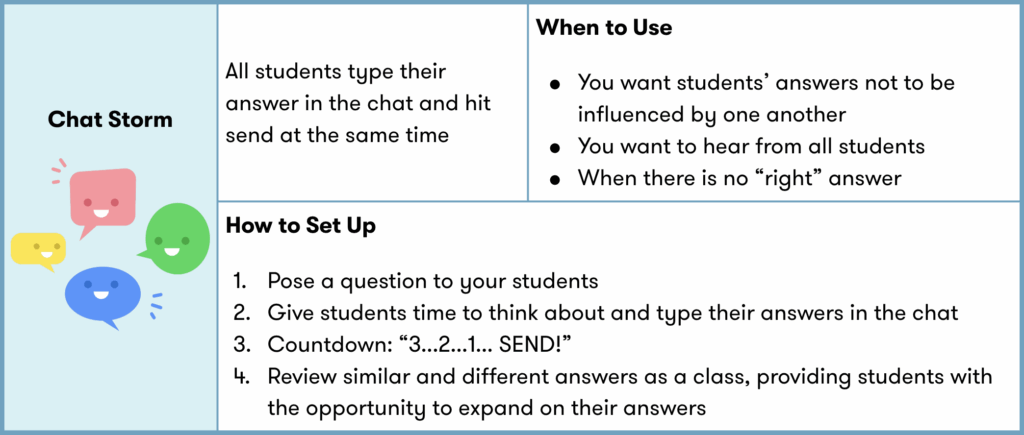
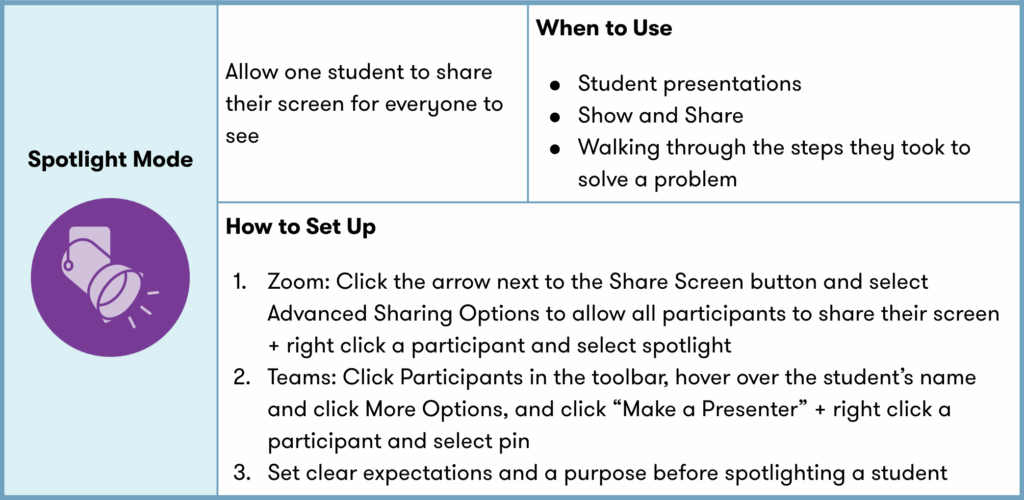
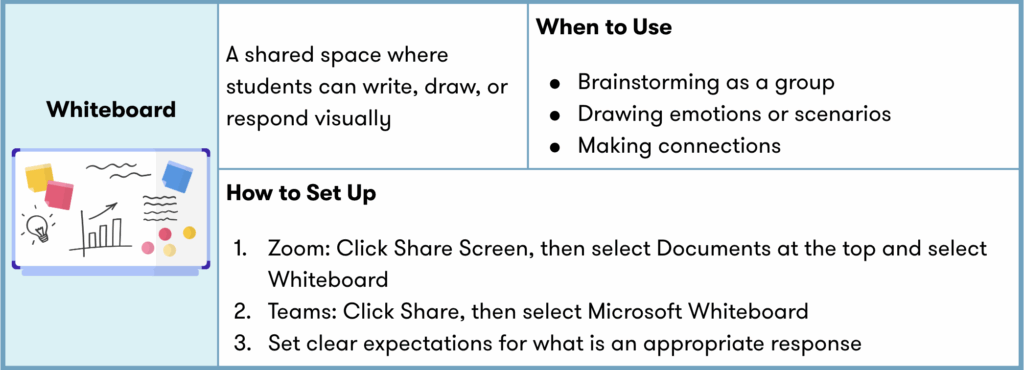
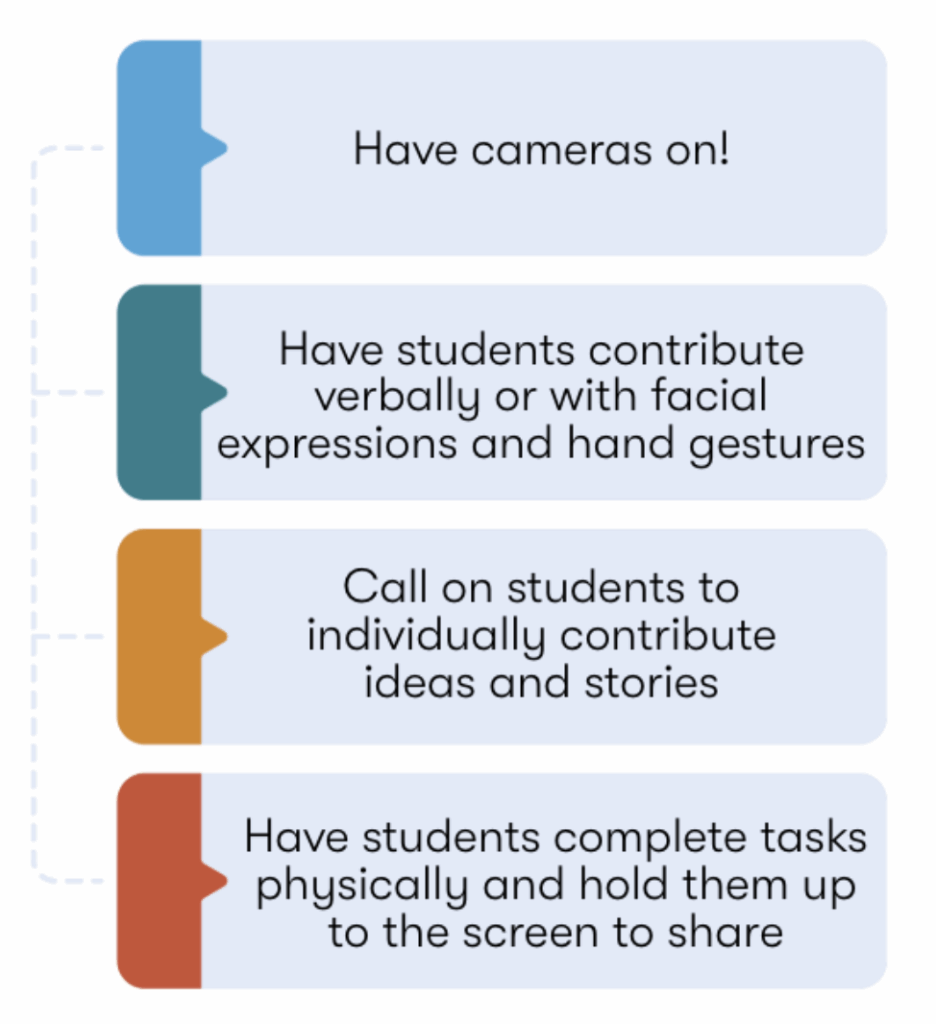
Adapting for Younger Learners
Younger students experience online learning differently. They need more structure, clearer directions, and opportunities to move and create. By simplifying tools, using visuals, and building in guided interaction, educators can create a supportive and engaging environment that meets students where they are developmentally.
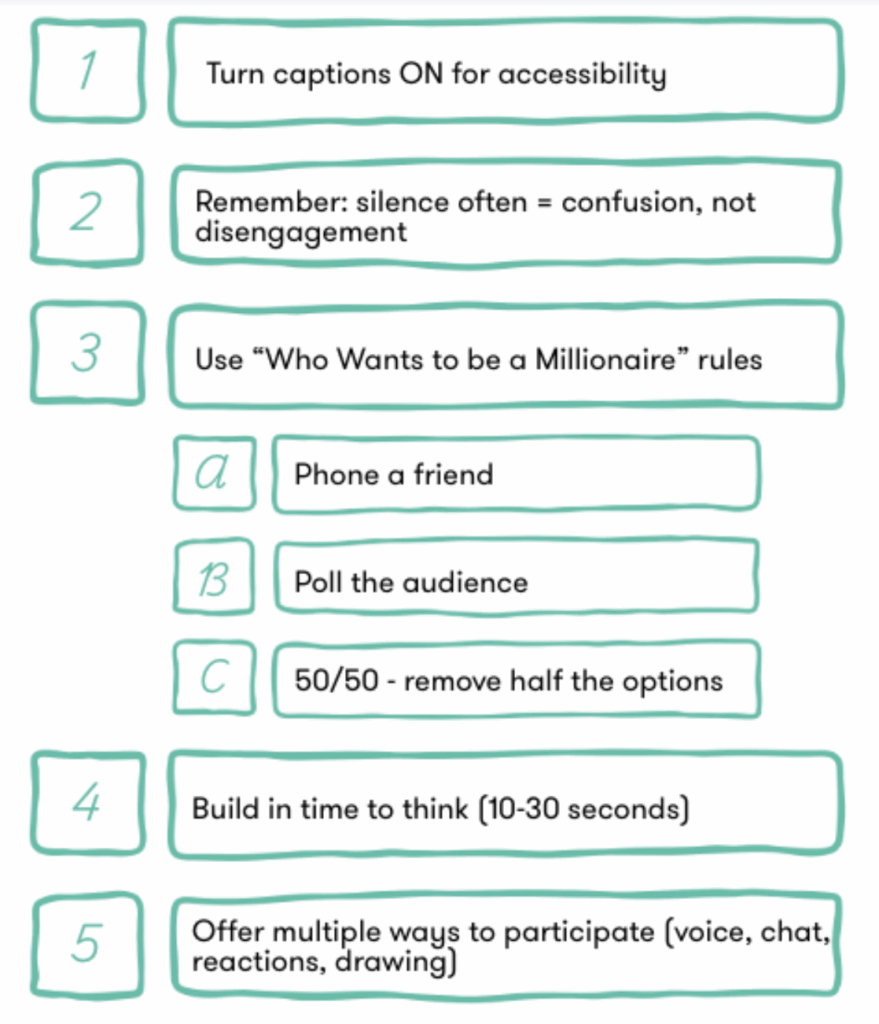
Quick Tips
Small adjustments can make a big difference in online learning. These quick, practical strategies help maintain momentum, reduce confusion, and ensure that all students have meaningful ways to participate. All while keeping wellbeing and connection at the center of your lesson!
Final Thoughts
Remote learning invites us to rethink not just how we teach, but how we connect. While the format may be different, the core of meaningful learning remains the same: relationships, engagement, and a sense of belonging.
By centring your lessons around connection, building in opportunities for interaction and play, and using online tools with intention, you can create experiences that feel active, inclusive, and human. As you continue to navigate online learning, remember that there is no perfect approach, only what works best for you and your students.